Java Error Handling
Effective exception handling is vital for building resilient Java applications. It allows programs to recover gracefully from unexpected errors while keeping the code clean and maintainable. In this article, we examine the core strategies and standards for managing Java exceptions efficiently.
What is an Exception?
Definition: An exception is short for an "exceptional event." It's an event that occurs during the execution of a program, disrupting the normal flow of the program's instructions.
Exception creating and throwing
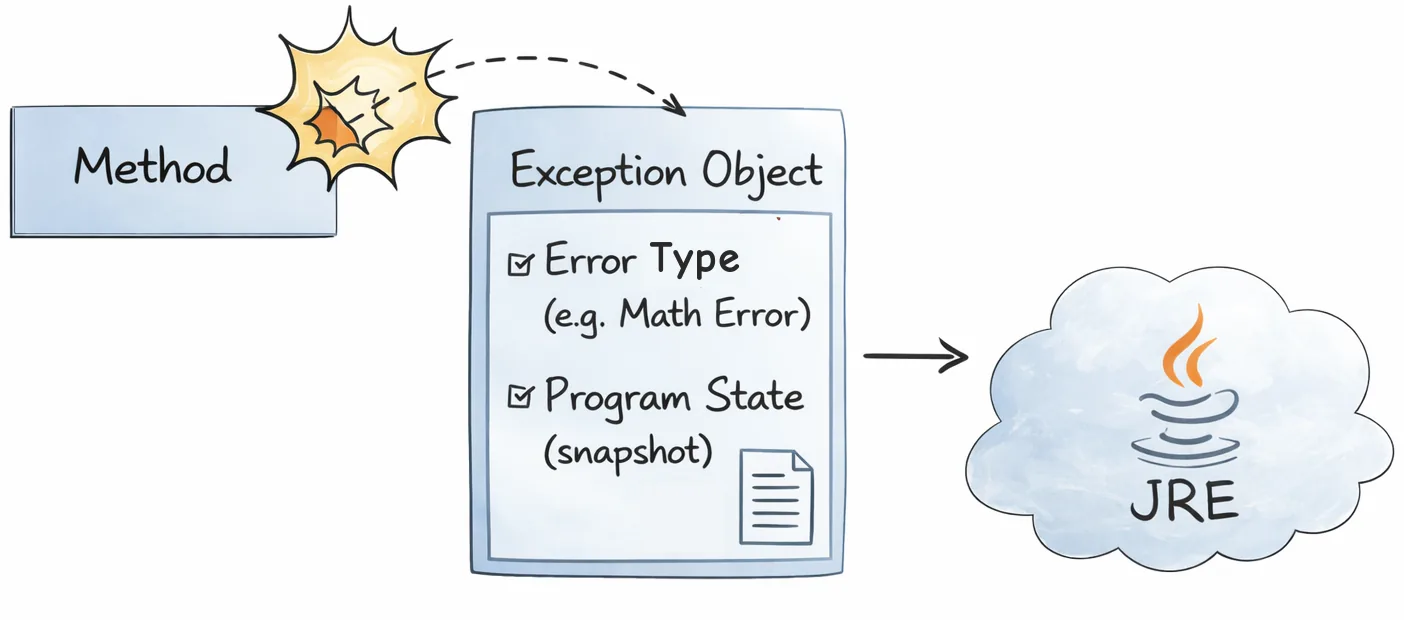
When an error occurs within a method, that method creates a specialized Exception Object. This object is a package containing:
- The type of error (e.g., math error, file missing).
- The state of the program (the "snapshot" of what was happening when it crashed).
The act of creating this object and handing it off to the Java Runtime Environment (JRE) is called throwing an exception.
Call Stack and searching for handler
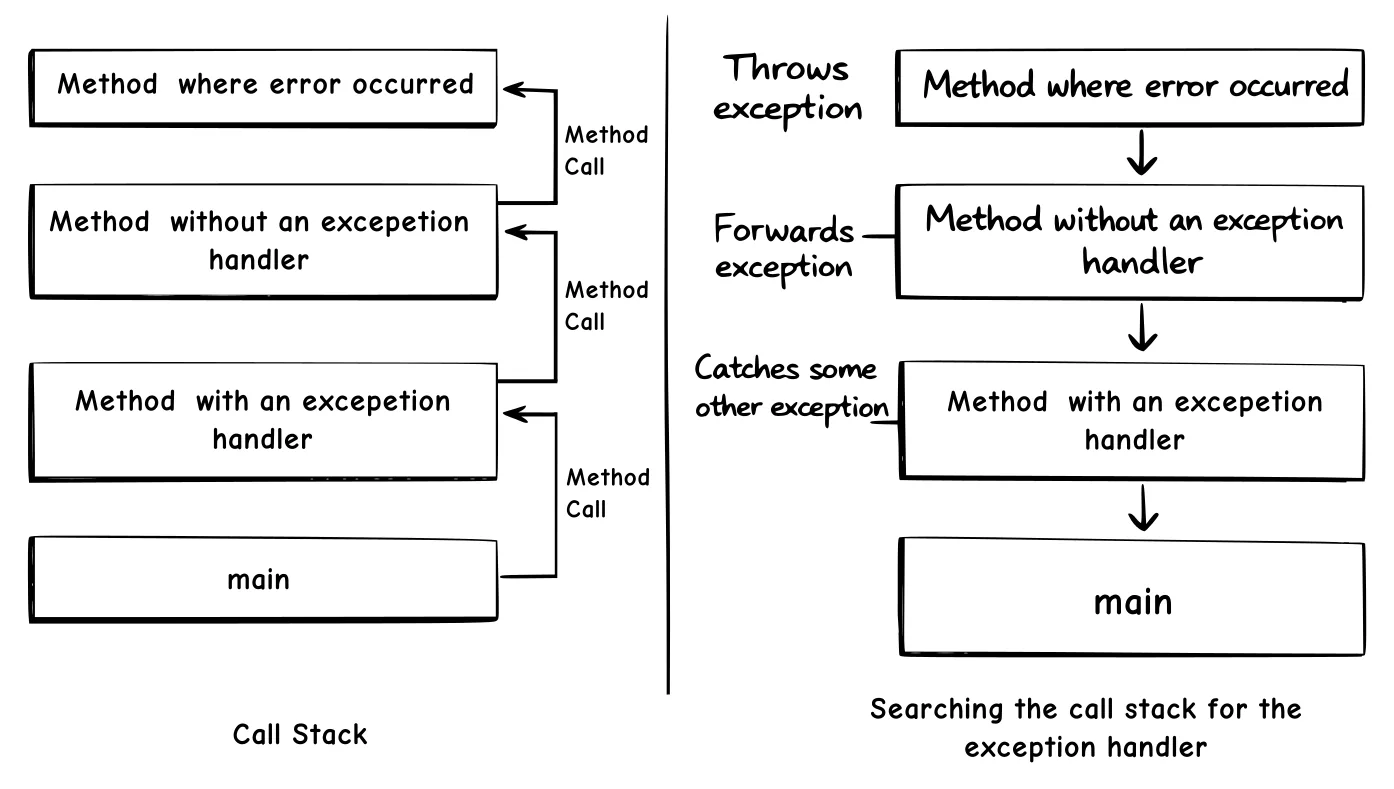
Once an exception is thrown, the runtime system needs to find a code to handle it. To do this, it looks at the Call Stack—the ordered list of methods that were called to reach the current point of failure.
The system searches this stack in reverse order (from the current method back toward the main method), looking for a block of code known as an exception handler.
Exception handler
An exception handler is the block of code (typically a catch clause) that intercepts a thrown exception and decides how to respond—logging it, translating it, retrying the operation, or cleaning up resources.
The Handler must be appropriate
A handler is considered "appropriate" if the type of the exception object thrown matches the type the handler is designed to catch.
If the runtime system searches every method on the call stack—all the way back to the main method—and still finds no appropriate handler, the search fails. At this point, the runtime system provides a default error message (the stack trace) and the program terminates (crashes).
Exception Classes
Common Exception Families
Java ships hundreds of exception classes, but they fall into a few key families:
- Standard Language (
java.lang): These are the most common runtime issues, such asNullPointerException,ArithmeticException,IllegalArgumentException,IndexOutOfBoundsException,ClassCastException, andNumberFormatException. - I/O & Networking: Essential for handling external data, including
IOException,FileNotFoundException,EOFException,MalformedURLException, andSocketException. - Concurrency & Multithreading: Used when managing threads and timing, such as
InterruptedException,ExecutionException,TimeoutException, andRejectedExecutionException. - Reflection & Class-loading: Found when inspecting code at runtime, including
ClassNotFoundException,InstantiationException,IllegalAccessException,NoSuchMethodException, andInvocationTargetException. - Security & Access: Used for permission and encryption issues, such as
SecurityException,AccessControlException, andInvalidKeyException. - Database & Persistence (JDBC): The standard for database errors, including
SQLException,SQLTimeoutException, andSQLSyntaxErrorException.
The Java Exception Hierarchy
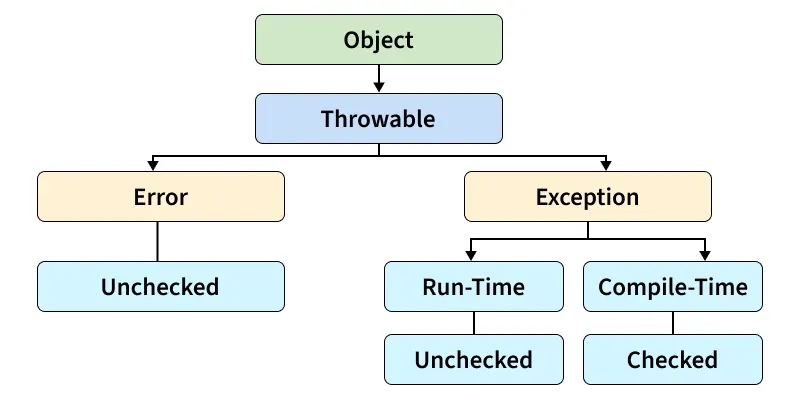
Each Java exception class is just a Java class that extends either Exception, RuntimeException, or Error. They typically add no extra code—just constructors—because all the useful behavior (message, stack trace, cause) lives in the superclass. For example, here are simplified versions mimicking how the JDK defines a few common exceptions:
public class NullPointerException extends RuntimeException {
    public NullPointerException() { }
    public NullPointerException(String message) {
        super(message);
    }
}

public class IOException extends Exception {
    public IOException() { }
    public IOException(String message) {
        super(message);
    }
    public IOException(String message, Throwable cause) {
        super(message, cause);
    }
}
NOTES
Throwable is the root type for everything you can throw in Java (both Exception and Error). In the IOException constructor, the cause parameter lets you wrap another throwable—often the original failure—inside the new IOException. Passing it up to super(message, cause) stores the causal chain so you can later call getCause() and inspect the original exception (This is called exception chaining; see below for a more detailed explanation).
In the above example, defining IOException or NullPointerException subclasses is essentially just creating a named alias for an exception type—the behavior lives in Throwable, while the subclass labels the specific failure.
Exception, RuntimeException, or Error are the three main branches under Throwable, the root of Java’s exception hierarchy.
Exceptionis the base for recoverable conditions. It splits into checked exceptions (must be declared/handled, e.g.,IOException) and unchecked ones (RuntimeExceptionand its children) for logic errors.RuntimeExceptioncovers programmer mistakes (null dereferences, illegal arguments, bad casts). The compiler doesn’t force you to handle these; you fix the code or catch them selectively. The application can catch this exception, but it probably makes more sense to eliminate the bug that caused the exception to occur.Errorrepresents JVM-level failures (OutOfMemoryError,StackOverflowError) that you generally can’t recover from; catching them is rare because they signal a fundamentally broken runtime state.
Note
Errors and runtime exceptions are collectively known as unchecked exceptions.
Examples
// Checked Exception example
try (FileReader reader = new FileReader("config.yaml")) {
    // read file...
} catch (IOException e) {                // must catch or declare
    System.err.println("Could not read config: " + e.getMessage());
}

// RuntimeException example
int[] nums = {1, 2, 3};
try {
    System.out.println(nums[5]);         // throws IndexOutOfBoundsException
} catch (IndexOutOfBoundsException e) {
    System.err.println("Bad index: " + e.getMessage());
}

// Error example (rarely caught)
try {
    recurseForever();                    // triggers StackOverflowError
} catch (StackOverflowError err) {
    System.err.println("Stack blew up—can’t safely recover.");
}
Pro tip
You can also create your own exception classes to represent problems that can occur within the classes you write. In fact, if you are a package developer, you might have to create your own set of exception classes to allow users to differentiate an error that can occur in your package from errors that occur in the Java platform or other packages.
How to throw an exception
In Java, "throwing" an exception is the process of signaling that an error or unexpected condition has occurred. You can throw an exception using three primary mechanisms: the throw keyword, the throws clause, and "rethrowing" within a catch block.
Using the throw Keyword
The throw keyword is used to manually trigger an exception from within a method. You typically use this after a conditional check (like an if statement) to prevent the program from continuing with invalid data.
Syntax:
throw new ExceptionClassName("Error Message");Example: In this example, we manually throw an IllegalArgumentException if a user provides an invalid age.
public void setAge(int age) {
    if (age < 0) {
        // Explicitly creating and throwing the exception object
        throw new IllegalArgumentException("Age cannot be negative!");
    }
    System.out.println("Age set to: " + age);
}
Using the throws Clause
If a method contains code that might throw a Checked Exception (like reading a file), but you don't want to handle it inside that method, you must declare it using the throws keyword in the method signature.
This "passes the buck" to the caller of the method, requiring them to handle the exception (also see).
Example: File Handling
import java.io.*;

public class FileService {
    // We declare that this method "throws" IOException
    public void openFile(String path) throws IOException {
        FileReader file = new FileReader(path); // This line might fail
        // ... read file logic
    }
}
Rethrowing an Exception
Sometimes you want to catch an exception, perform a specific action (like logging the error), and then throw it again so the calling method is still notified that a failure occurred.
Example: Logging and Escalating
public void processData() throws SQLException {
    try {
        connectToDatabase();
    } catch (SQLException e) {
        // 1. Log the error for the developer
        System.err.println("Database connection failed: " + e.getMessage());

        // 2. Rethrow the exception to the caller
        throw e;
    }
}
Exception Chaining (Wrapping)
In complex applications, one error often triggers another. For example, a low-level SQLException might cause a high-level AccountBalanceException. Chained Exceptions allow you to link these together, ensuring that even as you throw a new error, you don't lose the "root cause" of the original problem.
The Mechanics of Chaining
Java’s Throwable class provides specific constructors and methods to maintain this chain. When you "wrap" an exception, the original becomes the cause.
Key Methods in the Throwable Class:
Throwable(String message, Throwable cause): Constructor that sets a descriptive message and the original error.Throwable(Throwable cause): Constructor that sets only the cause.initCause(Throwable cause): Initializes the cause if it wasn't set during construction.getCause(): Returns the original exception (the root cause).
Implementation Example
Imagine you are building a data-saving utility. You want to hide the technical details of the database from the user, but keep them for the developer.
try {
    // Some logic that throws a low-level IOException
    saveData();
} catch (IOException e) {
    // We throw a high-level SampleException but ATTACH the IOException 'e'
    throw new SampleException("Persistence Layer Failure", e);
}
By passing e into the constructor, you create a link. When the stack trace is eventually printed, it will show both the SampleException and a section starting with "Caused by: java.io.IOException."
Accessing the Stack Trace
A Stack Trace is the execution history of your thread. It lists exactly which classes and methods were active when the crash happened. Sometimes, you want to access this data manually to format it for a custom dashboard or specialized log.
You can use the getStackTrace() method, which returns an array of StackTraceElement objects:
catch (Exception cause) {
    StackTraceElement[] elements = cause.getStackTrace();
    for (StackTraceElement element : elements) {
        System.err.println(element.getFileName()
            + ":" + element.getLineNumber()
            + " >> " + element.getMethodName() + "()");
    }
}
Professional Logging
Instead of using System.err, which just prints to the console, professional applications use the Java Logging API (java.util.logging). This allows you to send error details to files, databases, or remote servers.
try {
    // Set up a file to store logs
    Handler fileHandler = new FileHandler("app_errors.log");
    Logger.getLogger("").addHandler(fileHandler);
} catch (IOException e) {
    Logger logger = Logger.getLogger("com.myapp.services");
    // Logging the error at a WARNING level
    logger.log(Level.WARNING, "An error occurred in method: " + e.getStackTrace()[0].getMethodName(), e);
}
Catching and Handling Exceptions
Catching and handling exceptions is the process of intercepting an error object as it "bubbles up" the call stack and executing a specific block of code to resolve it.
In Java, this is governed by the Try-Catch-Finally mechanism. Here is a detailed breakdown of how it works.
The Anatomy of a Try-Catch Block
To handle an exception, you must wrap the "risky" code in a try block. If an error occurs, the JVM stops executing the try block and jumps immediately to the matching catch block.
public class MathService {
    public void calculate(int divider) {
        try {
            // Risky code: might throw ArithmeticException
            int result = 100 / divider;
            System.out.println("Result: " + result);
        } catch (ArithmeticException e) {
            // Handling code: runs ONLY if a math error occurs
            System.err.println("Cannot divide by zero! Defaulting to 0.");
        }
        System.out.println("Program continues...");
    }
}
Handling Multiple Exception Types
A single block of code might fail for different reasons. You can stack multiple catch blocks to provide specific solutions for specific problems.
Important: You must catch specific exceptions before general ones. If you catch Exception first, the more specific blocks below it will never be reached.
try {
    String text = null;
    int length = text.length(); // Throws NullPointerException

    int num = Integer.parseInt("abc"); // Throws NumberFormatException
} catch (NullPointerException e) {
    System.out.println("The string was null.");
} catch (NumberFormatException e) {
    System.out.println("The string was not a valid number.");
} catch (Exception e) {
    System.out.println("A generic error occurred: " + e.getMessage());
}
The Multi-Catch Block
If you want to handle different exceptions using the exact same logic, you can use the multi-catch syntax (introduced in Java 7) using the pipe | symbol. This reduces code duplication.
try {
    executeComplexLogic();
} catch (IOException | SQLException e) {
    // Both types of errors are handled here
    logger.log(Level.SEVERE, "External resource failure", e);
}
The finally Block
The finally block is used for cleanup code (like closing a database connection). It executes no matter what, even if:
- No exception occurred.
- An exception was caught and handled.
- An exception was thrown but not caught.
try {
    openDatabase();
    saveData();
} catch (Exception e) {
    System.out.println("Save failed.");
} finally {
    closeDatabase(); // This runs regardless of success or failure
    System.out.println("Connection closed.");
}
Try-with-Resources
Any class that implements the java.lang.AutoCloseable or java.io.Closeable interface can be used in a try-with-resources statement. Instead of manually calling .close(), Java ensures the resource is closed as soon as the try block exits.
To understand why this is better, look at the "Old Way" which was prone to errors and very wordy:
The Old Way (Pre-Java 7):
FileOutputStream fos = null;
try {
    fos = new FileOutputStream("data.txt");
    fos.write("Hello".getBytes());
} catch (IOException e) {
    e.printStackTrace();
} finally {
    if (fos != null) { // Manual null check
        try {
            fos.close(); // Manual close
        } catch (IOException e) {
            e.printStackTrace();
        }
    }
}
The Modern Way (Try-with-Resources): The resource is declared inside parentheses right after the try keyword. No finally block is needed for cleanup.
try (FileOutputStream fos = new FileOutputStream("data.txt")) {
    fos.write("Hello".getBytes());
} catch (IOException e) {
    // fos is ALREADY closed by the time we get here
    System.err.println("Error writing to file: " + e.getMessage());
}
Handling Multiple Resources
You can manage multiple resources in a single statement by separating them with a semicolon. They will be closed in the reverse order of their creation.
try (
    FileInputStream fis = new FileInputStream("input.txt");
    FileOutputStream fos = new FileOutputStream("output.txt")
) {
    // Copy logic here
} catch (IOException e) {
    // Both fis and fos are automatically closed
}
How JVM Matches the Handler
When an exception is thrown, the JVM performs a Type Match. It looks at the catch blocks from top to bottom. A handler is chosen if the exception object is an instanceof the catch parameter.
The Matching Rules:
- Exact Match:
catch (IOException e)matches anIOException. - Polymorphic Match:
catch (IOException e)also matches aFileNotFoundExceptionbecauseFileNotFoundExceptionis a subclass ofIOException. - The Catch-All:
catch (Exception e)matches almost everything, but it is considered poor practice to use it exclusively because it hides the specific nature of the error.